
If your Permafrost keybindings reset after restart, inspect the current Controls menu, restore the affected assignments, and test one normal relaunch before changing more settings. The reset has been reported both as a one-time event and as a recurring problem. A confirmed current fix or verified settings-file edit has not been established.
Treat this as a persistence check, not a reason to reset every control. Keep a screenshot of your intended layout so you can restore only the actions that changed. If the reset happens again, the before-and-after menu states provide useful evidence for a report.
Identify which assignments changed
Open Settings and look for the Controls page in your installed menu. Inspect the rows for the actions that stopped behaving as expected. Use the displayed assignment as your reference rather than a remembered default from another build.
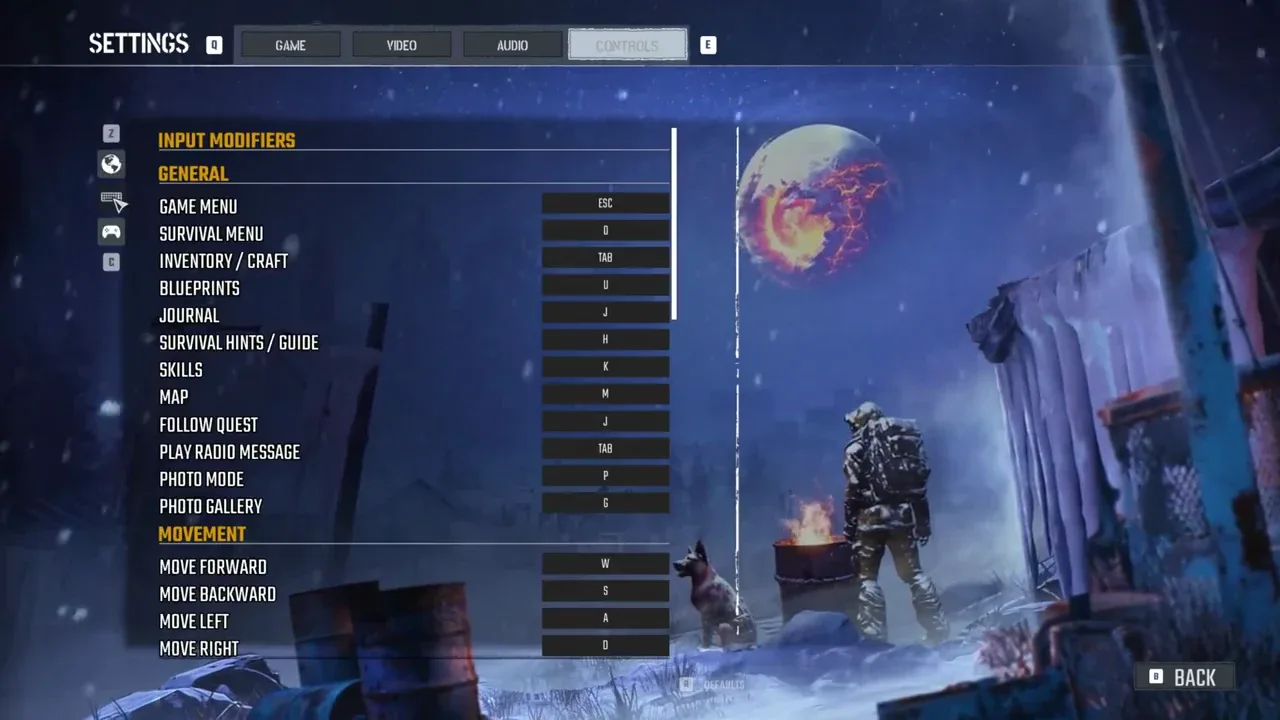
Record the action name, intended key, and value currently shown. A keyboard or mouse assignment is different from a controller assignment, so check the page matching the device you actually use.
Compare these situations:
| What you observe | What to check |
|---|---|
| The row changed back after restarting | Restore that action and document the old and new values |
| The row still shows your chosen key, but the action behaves differently | Test the action in the correct gameplay or menu context |
| A control is unassigned | Establish whether you had assigned it before; an unbound row alone does not prove a reset |
| Only some rows changed | List those rows rather than resetting the whole layout |
| The keyboard page looks correct but controller behavior differs | Inspect the controller assignments separately |
The early reports specifically included building and inventory controls, but that does not establish that only those actions can be affected. Use the actual changed rows in your installation to define the problem.
Restore the affected controls through the menu
Select the binding box for the affected action and assign the key you want to use. Inspect the displayed row afterward to confirm that the menu accepted the change. Repeat this only for the assignments that need restoring.
If your Controls page offers a Defaults action, use it only when you intend to discard the custom layout and return to the game's current defaults. Resetting everything is not required merely because one key changed, and it can make it harder to compare which assignments failed to persist.
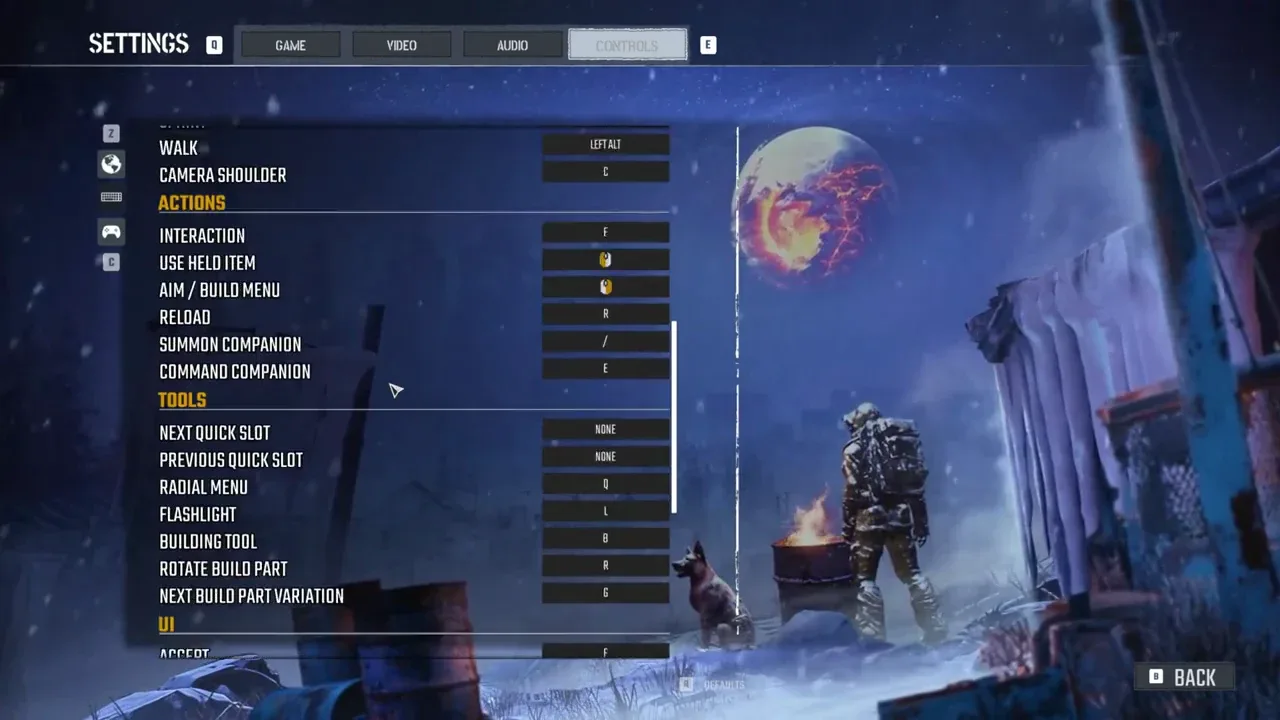
Use the menu's current hints when changing or leaving the page. Do not assume that the key used for a gameplay action has the same function inside Settings. A button may serve navigation or a menu-specific action there.
There is no confirmed requirement here to edit a configuration file, delete a settings folder, or replace the saved world. The supported practical route is to restore the assignment in the visible Controls menu and inspect what happens after relaunching.
Test the action in its intended context
Before restarting, leave Settings and test the changed action in a suitable context. For an inventory assignment, verify that it opens the intended screen. For a building assignment, check the Building Tool and the action associated with opening its menu rather than assuming one key performs every building step.
If the row shows the intended value but the action does not work, record that as an input-behavior mismatch. It is different from a binding that visibly reverted after restart.
Menu navigation, item interactions, and gameplay actions can share buttons while behaving differently in their respective screens. Check the prompt shown on the current screen before concluding that the binding reset. Avoid using a dangerous encounter as the first place to test an unfamiliar layout.
This gives you a clear baseline: the menu shows the intended assignment, and the action works before you close the game. Without that baseline, a later failure cannot be described accurately as a restart reset.
Check one normal relaunch
Take a screenshot of the restored rows, close the game normally, and relaunch it. Return to the same Controls page before doing more remapping. Compare the displayed values with the screenshot.
If the assignments remain, test the relevant actions again. That shows the layout survived this relaunch. It does not establish that the issue is permanently fixed, particularly because the original reports included both isolated and repeated resets.
If values revert, capture the changed rows. Note whether every custom assignment reset or only certain actions changed. Also distinguish fully restarting the game from loading a world again while the game remained open.
Do not change several unrelated settings between the two checks. A focused comparison makes it easier to report the exact persistence failure and reduces the work required to restore your layout again.
Keep a small recovery reference
Save the screenshot of your preferred bindings for the actions you use most. Include movement, interaction, inventory, and the building controls you customized. A reference image is a manual recovery aid, not a fix for the settings bug.
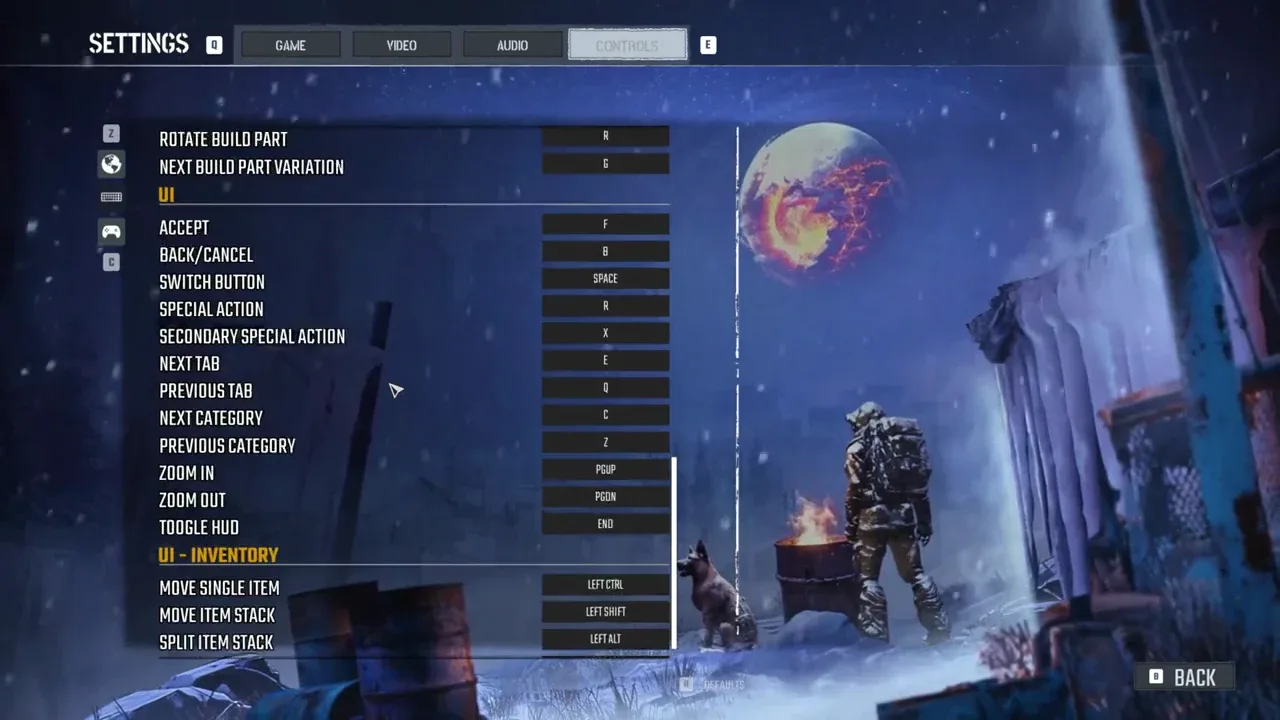
If only a few bindings repeatedly revert, restore those at the start of the session and verify them before leaving your shelter or starting a long trip. This is a temporary way to keep playing with the intended controls; it does not guarantee that they will remain after the next restart.
A controller limitation may also look like an input failure: crafting with a controller is still listed as unavailable. Remapping a controller button should not be promised to repair that separate limitation.
Report a reproducible reset
If the layout resets again, report the affected action names and the before-and-after assignments. Include whether you use keyboard and mouse or a controller, whether the action worked before closing, and whether the reset happens every restart or only occasionally.
Add the installed version or build if displayed by your installation. Include the screenshots, and provide logs through the developer reporting process; include the save as requested by that process when relevant. State whether the menu value changed or only the action's behavior changed.
No confirmed current keybinding-reset patch was established for this issue. A normal relaunch that preserves the layout is a useful observation for your machine, while a documented repeated failure gives the team a concrete persistence problem to investigate.
Sources and version notes
Sources checked: 12 October 2026. Verification labels refer to the cited documentation and its stated limits; this site has not independently tested these steps in the game. Compare the information with your installed build.
- Keybinds not saving on restart? :: Permafrost General Discussions — Developer replies and player reports. Scope: Restart can reset B/inventory bindings in reported saves; developer acknowledged/escalated; administrator test only player suggestion.
- Permafrost Default Key Bindings for Keyboard and Controller — Third-party guide. Scope: Keyboard defaults: F interaction, Tab inventory, B building tool, U blueprints, E companion command, / summon.
- Known Issues & Workarounds (Updated October 11) — Developer issue post. Scope: General Early Access issue context; key-reset evidence comes from the separate linked discussion.
- Permafrost Preview: What We Learned — Developer announcement. Scope: Historical GPU renderer -dx11 and Windows11c7 origin; movement rebinding introduced.
Preview or launch-era advice is historical context. A previously working setting or renderer test is not a guarantee for every later update or hardware configuration.