
Permafrost's existing fast travel sled posts are at Horizon, Solar Fields, Church, Crow's Nest, and The Last Stand. Reach a post on foot and unlock it in person. Once two posts are unlocked, use either one to travel to the other.
Look for a wooden post with sleds at its foot. A settlement visit alone does not activate the destination, and every safe zone does not have a post. Existing posts can be used without obtaining the buildable Fast Travel Point blueprint, whose quest unlock is still listed as broken.
Find the five existing posts
Use the destination names below when identifying a post on the map or in its interaction. Solar Fields is the travel name for the post at Solar Power Plant. Last Stand can appear as the travel label for The Last Stand settlement.
| Travel destination | Place to search | Useful identification detail |
|---|---|---|
| Horizon | Main square near Robyn's cabin | Raised wooden platform to the left of her porch |
| Solar Fields | Solar Power Plant | Check for the Solar Fields name on the post |
| Church | Snow in front of the Church at House Camp | Post, notice board, lantern, and sleds outside the front steps |
| Crow's Nest | Inside Crow's Nest settlement | Search the settlement for the wooden post and sleds |
| Last Stand | The Last Stand safe zone | Find and activate its post before using it as a destination |
Exact post coordinates for all five locations are not established here. Use the named settlement and the visible post instead of treating an approximate area label as the activation point.
Sonnenberg's Clinic and Technocrats Colony are safe zones but are not among these five existing post locations. Reaching them should not make you expect a new travel destination automatically. Check the nearby network you have already activated when planning a return.
Activate Horizon during the first visit
Horizon is the early settlement to add to your network. Search the open square near Robyn's cabin. The post is on a raised wooden platform to the left of her porch, with a sled beside it.
Approach closely enough to see Fast Travel: Horizon and the unlock interaction. Use the displayed control to activate the post. Existing-post activation is free and does not require crafting materials.
Unlock it even if you have no second destination yet. That establishes Horizon as a return point once you find and activate another post. It does not let you travel to unexplored destinations.
Locate the Church sleds outside the building
The Church is identified by the LOCAL CHURCH sign on its front lawn. From the front double doors, go down the steps and look across the open snow immediately in front of the building.
The post has a wooden sign hanging from an arm at the top, a notice board with a lantern, and sleds at its foot. Before unlocking, snow covers the sleds and board, making the point look more like a heap around a pole than a ready travel station.
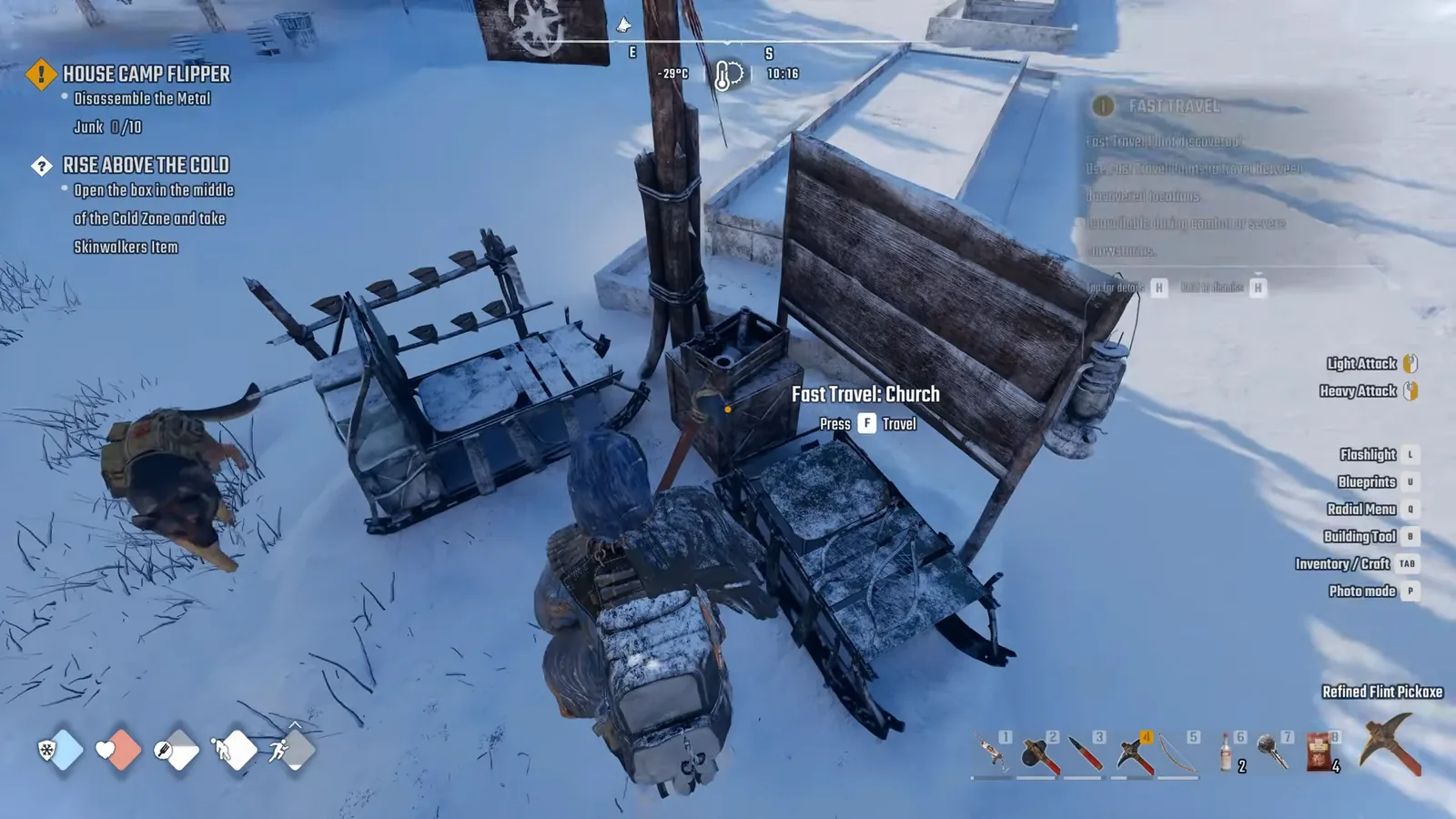
The Travel prompt confirms that the Church point has been activated.
Walk toward the sleds until you see Fast Travel: Church with Press F Unlock. Press F to activate it. The snow clears from the sleds and board, the prompt changes to Press F Travel, and the point appears on the map as a sled symbol.
The change from Unlock to Travel is the practical confirmation. Seeing the Church on the map, entering the building, or talking to Anna does not replace that post interaction.
Add the other settlements as your route reaches them
At Solar Power Plant, look for the existing post labelled Solar Fields. The difference between the building name and the travel label is worth remembering when you choose a destination later.
At Crow's Nest, find the post within the settlement. At The Last Stand, find its safe-zone post and activate it during the visit. The confirmed locations identify the settlements; they do not establish a left-or-right interior route for these posts.
Check every new post while you are already nearby. Unlocking it at that moment prevents a later trip solely to activate a destination you passed earlier. Keep enough time and supplies for the first walk, because a post you have not reached cannot serve as the return endpoint yet.
Travel from an unlocked post
Fast travel starts at the post itself. A bed is used for rest or respawning; it does not replace a sled post for this interaction.
To make the trip:
- Approach an unlocked post and use Press F Travel.
- Find another unlocked sled symbol on the map that opens.
- Select that destination's symbol.
- Check the name in the destination panel.
- Choose Confirm to travel, or Cancel to remain where you are.
Zoom the map if the destinations do not fit clearly in view. Check the selected place name before confirming, especially when you are using Solar Fields or Last Stand labels rather than the full settlement name you remember.
After confirmation, a brief black-screen transition leads to the destination sleds. There is no fare or required travel item for the existing network. The in-game clock continues advancing during the trip, so do not use an exact observed transition time as a promise of identical timing on every system.
Your following dog travels with you, carrying its stored supplies. In co-op, a guest may not see the dog correctly because of the known visibility issue. A missing dog model alone does not establish that the travel destination failed; first check your own arrival beside the selected post.
Resolve a missing or unavailable destination
The first check is activation. If you have only unlocked one post, you have no second endpoint for a journey. If a settlement is missing from the destination list, return to its post and verify that you actually used its unlock interaction.
| Problem | Relevant check |
|---|---|
| Only one post is active | Discover and unlock another existing post |
| A visited settlement is absent | Confirm its post was activated, rather than merely visited |
| Solar Power Plant is hard to find in the list | Check the Solar Fields destination name |
| Travel refuses to start during a fight | Leave combat before retrying |
| Travel refuses during a severe snowstorm | Wait for the severe storm to clear |
| You are interacting with a bed | Go to an unlocked sled post |
Combat and severe snowstorms block fast travel. Do not plan a dangerous excursion on the assumption that a nearby post will provide an immediate emergency exit. Reach safety normally when those restrictions are active, then retry the post once travel becomes available.
Use the existing network while the buildable unlock is unreliable
The buildable Fast Travel Point is a separate station blueprint. The intended reward is associated with House Camp Flipper, in a reward box at the improvised tower near Finn, but the unlock remains listed as broken.
Do not delay activating the five existing posts while waiting for that reward. The settlement network already works between its unlocked endpoints, and it does not require the base-building blueprint.
If your base lacks its own point, plan from the closest existing destination you have activated and account for the remaining walk. No guaranteed workaround for the broken buildable unlock is established here, so avoid treating repeated reward-box visits as a confirmed fix.
Keep a usable record of your network
Custom map markers can disappear when the game is relaunched. A custom marker that you placed for a post and the post's activation are different records; losing the marker alone does not prove that the sled is locked again.
For return planning, keep the destination names you have activated and check the Travel menu at an existing post. A screenshot of the unlocked destinations can also help you distinguish an activation you completed from a place you only intended to visit.
The completed network is the set of posts you can select from another unlocked post. Use that practical check after discovering a new location, and keep the first walk and the later fast journey separate when planning supplies.
Sources and version notes
Sources checked: 12 October 2026. Verification labels refer to the cited documentation and its stated limits; this site has not independently tested these steps in the game. Compare the information with your installed build.
- Permafrost: How to Fast Travel Between Two Unlocked Points — Guide with attributed gameplay. Scope: Unlock Church/Horizon sled posts with F; requires two already-unlocked points; map destination/Confirm flow.
- Permafrost beginner tips: quick answers to common early questions — Community summary. Scope: First door stone shiv held +F about5s; dismantling church bench; sled F activation; own-inventory crafting.
- Quest Issues & Workarounds (The Way Home and more) — Developer issue post. Scope: Skinwalker dialogue Space / host alone; out-of-order repairs or reward pickup can fail; base radio first.
Existing-source named travel posts do not establish exhaustive current count, all spawn coordinates or latest craftable recipe unlock.